
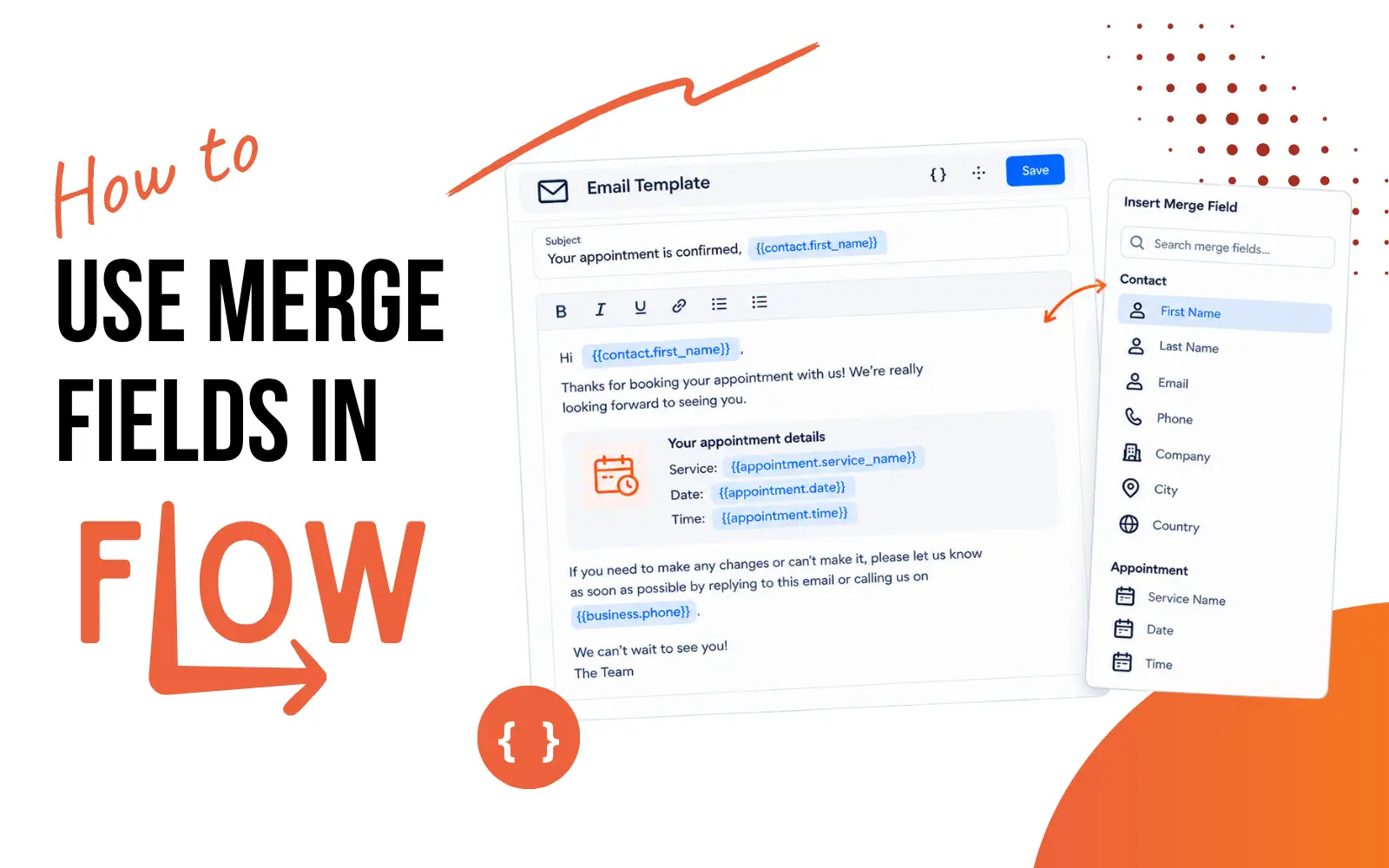
How to use merge fields in Flow
📖 3 minute read
Merge fields personalise your emails, SMS, and forms by inserting contact information automatically. Instead of "Hi there", send "Hi Sarah". Instead of generic content, send personalised content based on what you know about each contact.
What Are Merge Fields?
A merge field is a placeholder code that pulls information from a contact's record and inserts it into your message. When you send an email with a merge field, Flow replaces the code with the contact's actual information.
Merge Field Example
What you write: "Hi {{contact.first_name}}, thanks for booking your {{appointment.service_name}}."
What Sarah sees: "Hi Sarah, thanks for booking your strategy session."
What Mike sees: "Hi Mike, thanks for booking your coaching call."
The merge field {{contact.first_name}} stays the same in your email template. But each contact sees their own name, because Flow looks up that field in their contact record.
How to Use Merge Fields
In Emails
When composing an email (manual or automation):
- Type your email content
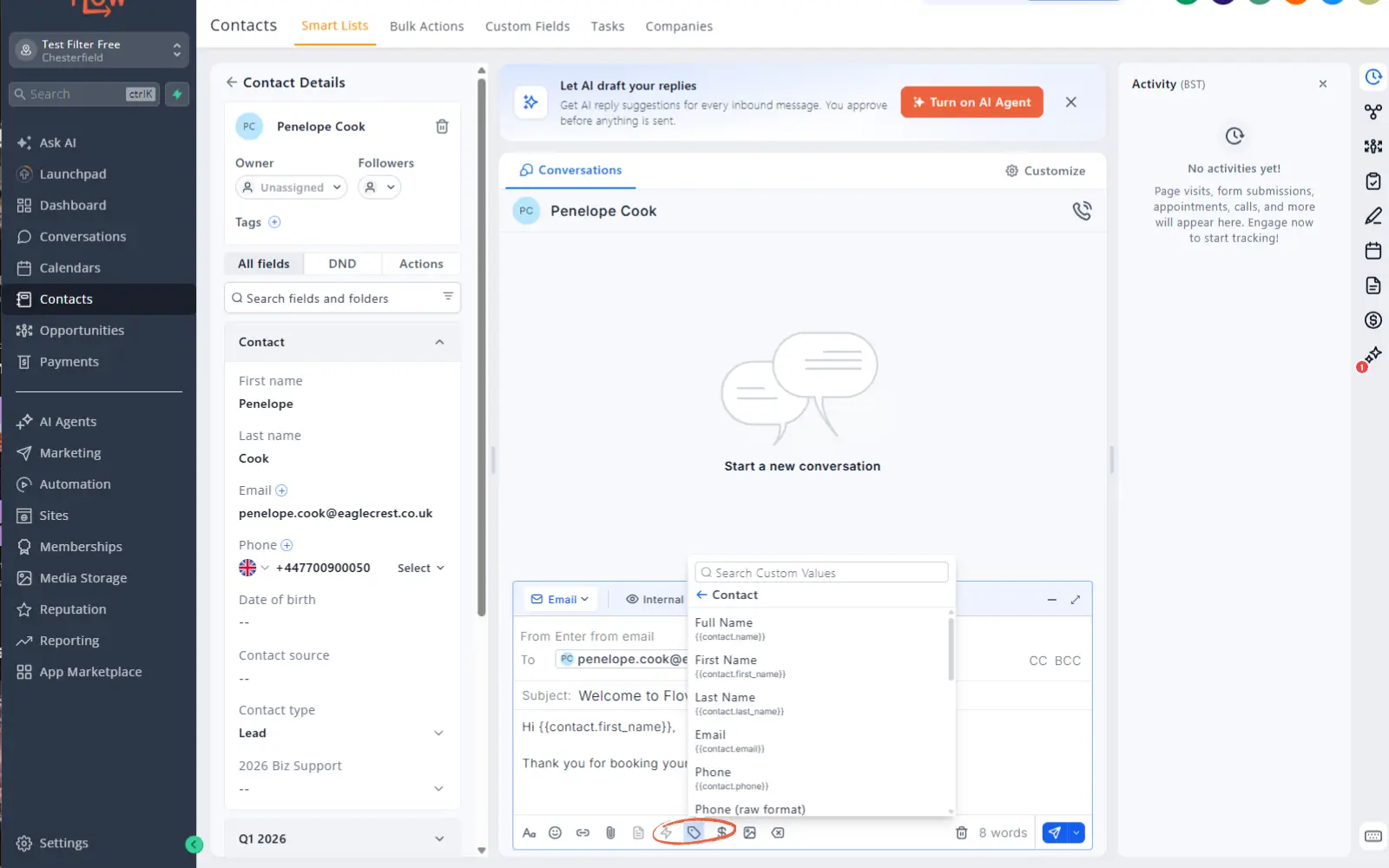
- Where you want contact information, either type/paste the merge field code into your message (encased in {{ }} ), or click the custom values button under your message (the one that looks like a label).
- Click it to see available fields
- Select the field you want e.g. First Name
- Flow inserts the merge code e.g. {{contact.first_name}} into your email
- Send. Each contact sees their own personalised version
In SMS Messages
Same process as emails. Click the merge fields button and insert the code you want. SMS works best with just first name: "Hi {{contact.first_name}}, your appointment is tomorrow."
Creating your own merge fields
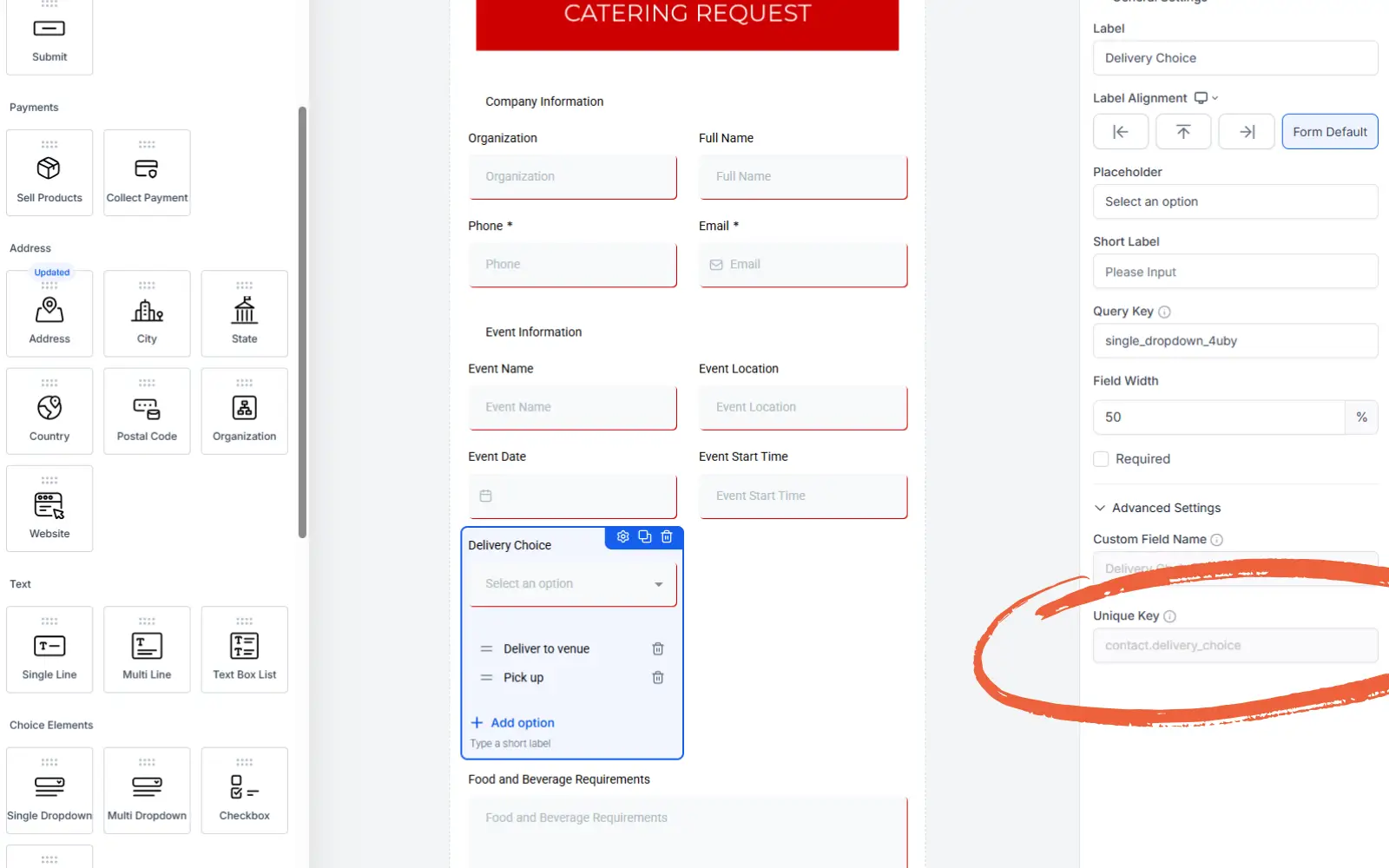
When you create a new field in forms & surveys, a merge field will be assigned so you can use any customer answers in your future messages. To find out more about how to build forms and surveys visit our lesson How to create forms and surveys in Flow.
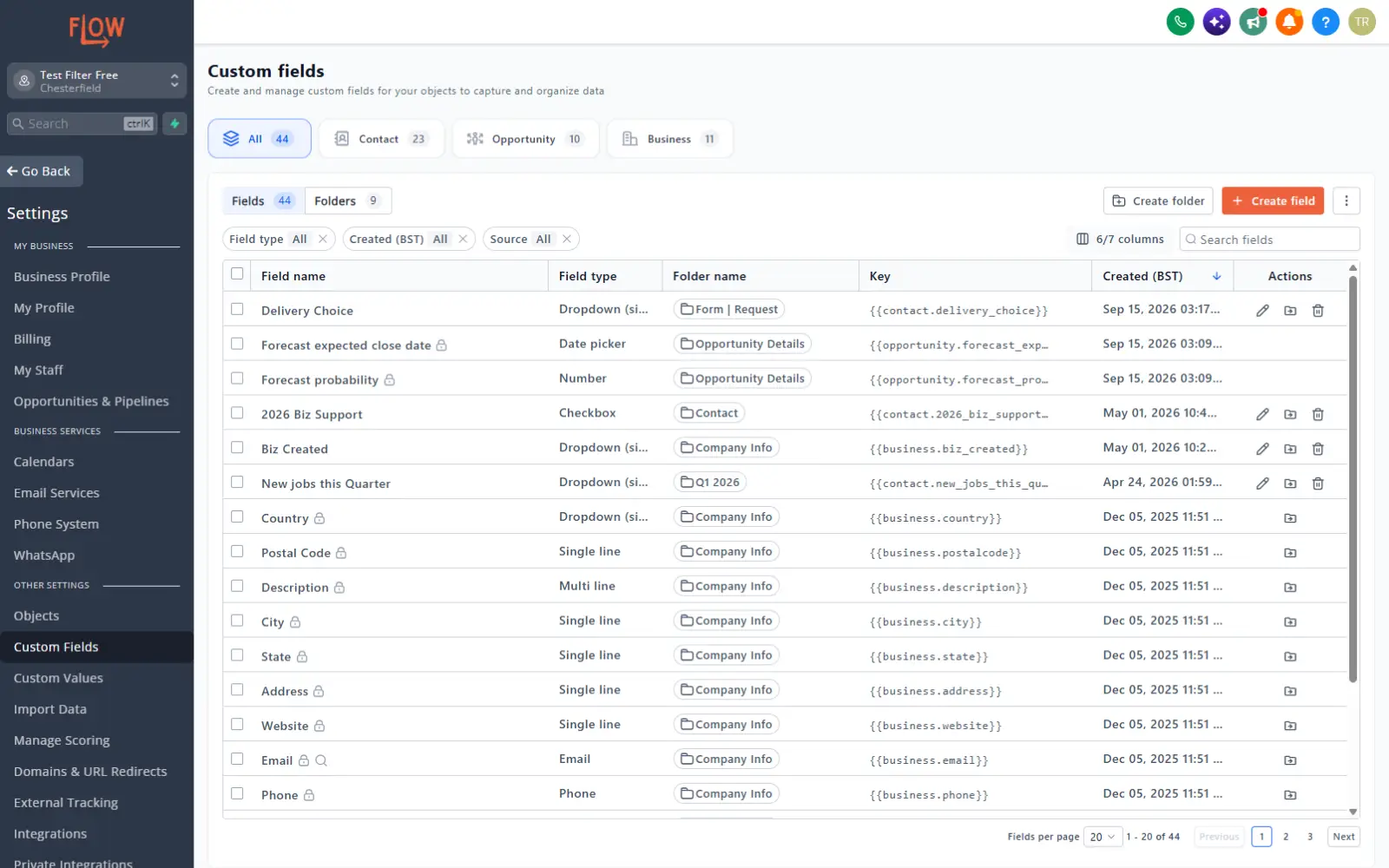
You can also edit and create these in your account by going to settings - custom fields and editing them within this page.
Merge Fields List
Contact Merge Fields
Copy and paste any of these merge fields into your messages:
Name | Merge Field | Example |
|---|---|---|
Full name | {{contact.name}} | Jane Smith |
First name | {{contact.first_name}} | Jane |
Last name | {{contact.last_name}} | Smith |
{{contact.email}} | jane@smith.com | |
Phone | {{contact.phone}} | (01246) 511987 |
Phone (raw format) | {{contact.phone_raw}} | +441246511987 |
Company name | {{contact.company_name}} | Smith Plumbing |
Full address | {{contact.full_address}} | 1234 Main St, Sheffield, Yorkshire, S12 1AA |
Address line 1 | {{contact.address1}} | 1234 Main St |
City | {{contact.city}} | Sheffield |
State/Region | {{contact.state}} | Yorkshire |
Postal code | {{contact.postal_code}} | S12 1AA |
Time zone | {{contact.timezone}} | GMT +00:00 London |
Date of birth | {{contact.date_of_birth}} | Jan 3, 1980 |
Source | {{contact.source}} | Referral |
Website | {{contact.website}} | www.smithplumbing.com |
Contact ID | {{contact.id}} | FZDn5mYlkZuCCQe5Bep8 |
USER NAME Merge Fields
These merge fields pull your own user login data e.g. your own email address.
Name | Merge Field | Example |
|---|---|---|
Full name | {{user.name}} | John Doe |
First name | {{user.first_name}} | John |
Last name | {{user.last_name}} | Doe |
{{user.email}} | john@doe.com | |
Phone | {{user.phone}} | 01246 872617 |
Phone (raw format) | {{user.phone_raw}} | +441246872617 |
Email signature | {{user.email_signature}} | John Doe john@doe.com 01246 872617 |
Booking link | {{user.calendar_link}} | https://booking.example.com |
Contact Merge Fields
Copy and paste any of these merge fields into your messages:
Name | Merge Field | Example |
|---|---|---|
Full name | {{user.name}} | John Doe |
First name | {{user.first_name}} | John |
Last name | {{user.last_name}} | Doe |
{{user.email}} | john@doe.com | |
Phone | {{user.phone}} | (333) 555-9876 |
Phone (raw format) | {{user.phone_raw}} | +13335559876 |
Email signature | {{user.email_signature}} | John Doejohn@doe.com(333) 555-9876 |
Booking link | {{user.calendar_link}} | https://booking.example.com |
Appointment user phone (raw) | {{appointment.user.phone_raw}} | +13335559876 |
External calling number | {{user.call_provider_phone_number}} | (234) 555-9876 |
External calling number (raw) | {{user.call_provider_phone_number_raw}} | +12345559876 |
Appointment Merge Fields
These fields pull details from an appointment record and are usually used in confirmations, reminders, and reschedule messages.
| Name | Merge Field | Example |
|---|---|---|
| Title | {{appointment.title}} | Appointment with Bob |
| Start date/time | {{appointment.start_time}} | Wed, Nov 5, 2027 3:30 PM |
| Start date only | {{appointment.only_start_date}} | Nov 5, 2027 |
| Start time only | {{appointment.only_start_time}} | 3:30 PM |
| End date/time | {{appointment.end_time}} | Wed, Nov 5, 2027 4:00 PM |
| End date only | {{appointment.only_end_date}} | Nov 5, 2027 |
| End time only | {{appointment.only_end_time}} | 4:00 PM |
| Day of week | {{appointment.day_of_week}} | Monday |
| Month number | {{appointment.month}} | 11 |
| Time zone | {{appointment.timezone}} | BST |
| Cancellation link | {{appointment.cancellation_link}} | https://booking.example.com/ cancel?event_id=123 |
| Reschedule link | {{appointment.reschedule_link}} | https://booking.example.com/ reschedule?event_id=123 |
| Meeting location | {{appointment.meeting_location}} | 1234 Main St, Sheffield, Yorkshire, S12 1AA |
| Notes | {{appointment.notes}} | This is our second meeting. |
| Add to calendar link | {{appointment.add_to_calendar}} | https://booking.example.com/ add-to-calendar?event_id=123 |
| Google Calendar link | {{appointment.add_to_google_calendar}} | https://booking.example.com/google/ calendar/add-event/calendarid |
| iCal/ICS link | {{appointment.add_to_ical}} | https://booking.example.com/ get-ics?event_id=123 |
| Recurring repeats | {{appointment.recurring.repeats}} | 0 |
| Recurring times to repeat | {{appointment.recurring.times_to_repeat}} | 1 |
| Assigned user name | {{appointment.user.name}} | John Doe |
| Assigned user email | {{appointment.user.email}} | john@doe.com |
| Assigned user phone | {{appointment.user.phone}} | 07467 872637 |
| Assigned user phone (raw) | {{appointment.user.phone_raw}} | +447467872637 |
| Assigned user signature | {{appointment.user.email_signature}} | John Doe john@doe.com |
Account Merge Fields
These fields pull business or account-level details used for branding, receipts, and standard business identity.
| Name | Merge Field | Example |
|---|---|---|
| Account name | {{location.name}} | Your Business Name |
| Full address | {{location.full_address}} | Your Business Address |
| Address line 1 | {{location.address}} | 555 Oak St |
| City | {{location.city}} | Sheffield |
| State/Region | {{location.state}} | Yorkshire |
| Country | {{location.country}} | U.K |
| Postal code | {{location.postal_code}} | S1 4AA |
| {{location.email}} | name@domain.com | |
| Phone | {{location.phone}} | (01246) 726 817 |
| Phone (raw format) | {{location.phone_raw}} | +441246726817 |
| Website | {{location.website}} | mywebsiteurl.com |
| Logo URL | {{location.logo_url}} | https://files.example.com/logo.png |
| Owner first name | {{location_owner.first_name}} | Lisa |
| Owner last name | {{location_owner.last_name}} | White |
| Owner email | {{location_owner.email}} | lisa@white.com |
| Account ID | {{location.id}} | DP4mTqaz7L9XpweFvRjC |
RIGHT NOW Merge Fields
These fields insert the current time values at the moment the message is generated.
| Name | Merge Field | Example |
|---|---|---|
| Second | {{right_now.second}} | 9 |
| Minute | {{right_now.minute}} | 10 |
| Hour (24h) | {{right_now.hour}} | 14 |
| Hour (AM/PM) | {{right_now.hour_ampm}} | 2 |
| AM/PM | {{right_now.ampm}} | PM |
| Day of week | {{right_now.day_of_week}} | Tuesday |
| Month name | {{right_now.month_name}} | November |
| Day | {{right_now.day}} | 22 |
| Month (number) | {{right_now.month}} | 11 |
| Year | {{right_now.year}} | 2027 |
| Date (MM/DD/YYYY) | {{right_now.middle_endian_date}} | 11/22/2027 |
| Date (DD/MM/YYYY) | {{right_now.little_endian_date}} | 22/11/2027 |
Make Every Message Personal
Merge fields turn generic emails into personal conversations. Spend 30 seconds adding a few merge fields to your emails and SMS. Your open rates, click rates, and conversions will improve immediately because people respond to messages that feel written for them, not broadcast to everyone.